- Version 0.0.97 is now available
Issues Addressed
- An issue that occasionally prevented history records from being created has been fixed.
- An issue that reset the dance play position to the start of a dance when toggling voice cues on or off has been fixed.
- The ability to remove a category that is currently in use by dances has been fixed. The affected dances are updated.
August 21, 2022
- Version 0.0.96 is now available
Issues Addressed
- An issue where the dance total time and remaining time on the play window weren’t updated when the music file was edited (usually shortened) has been fixed.
New Features
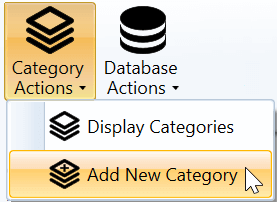
- You can now add a new category from the File > Category Actions menu. This is in addition to adding a new category from the edit dance window by typing the name of the new category into one of the category fields.
- You can edit the name of a category from the categories window by double clicking the category line (or right clicking and choosing the Edit Category option).
- You can click on the time slider at the bottom of the play window to reposition the music to the location you click (instead of dragging the slider). This also works for the video player to reposition the video.
- You can control the default length of history displayed in the history window. The setting for this is located on the General tab of the settings window.

July 24, 2022
- Version 0.0.95 is now available
Issues Addressed
- An issue with Portable DanceWizard USB drives, where the application may fail to start due to a missing license file, has been fixed.
- The dance ratings have been hidden until I explore a way of providing this in a way that isn’t publicly visible when you’re cueing.
June 20, 2022
- Version 0.0.94 is now available
Issues Addressed
- An application failure when marking a dance as needing to be fixed from the Play window has been fixed. This would only happen if the dance database hasn’t been upgraded to support DanceWizard features.
- A failure in cue card processing where there is a table following the cues has been fixed.
New Features
Dance Ratings
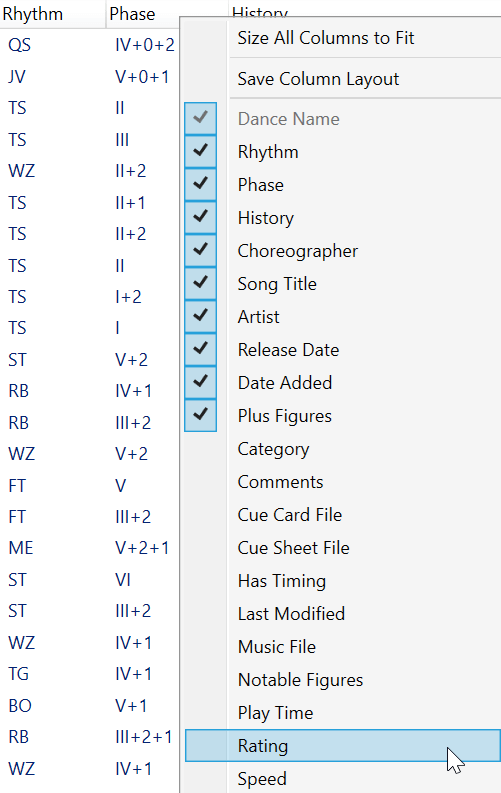
In addition to a dance’s Preferred flag, a rating of 0 to 5 stars can be assigned. You can use this to organize your dances into how preferred any particular dance may be. This new rating can be displayed on the dance selection window (click a column heading and add the Rating field).
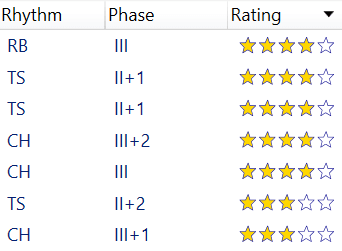
After adding this field you will have a Rating column that displays stars (similar to movie ratings). Clicking the rating column header will sort your dances by rating.
The play window displays the rating of a dance as part of the header. You can click on the stars in the play window to change a dance’s rating. Hold the Control key down when clicking on a star to turn that star off (useful if you want to set no stars).
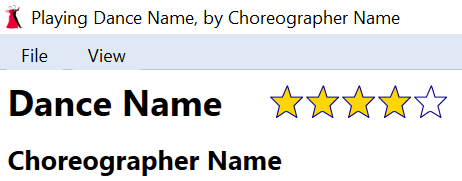
A dance’s rating can also be changed from the Edit Dance window.
June 19, 2022
- Version 0.0.93 is now available
Issues Addressed
- A possible application failure when closing the play window while a dance is playing has been fixed.
- An issue where music and voice cues playback becomes out of sync with the karaoke has been fixed. This could happen if you start playing a dance, then pause, then select a bookmark to reposition the dance, and then use the slider to reposition.
- The volume control sliders have been made more responsive for changes in music or voice cues volume. This can be disabled if you prefer the old behavior by clearing the Logarithmic volume control enabled checkbox on the Audio tab of the Settings window.
New Features
- Additional changes to better support larger than normal font sizes (this can be changed in Windows under Settings > Accessibility > Text size) have been implemented.
- When creating a bug report using a beta test license DanceWizard will now ask for your email address.
- Dances that are in the current playlist are displayed with a beige background on the selection and history windows. This helps when building a large playlist to see which dances are already present.
- Hovering the mouse over a dance in the selection or history window, or in a playlist, now displays some additional information about the dance.